




Latest Version
Keen Widget
Tools
Mac
Free
6752506001
Report a Problem
More About File Workflow Widget
The Ultimate Menu Bar Assistant for Mac Users
Managing a cluttered hard drive can quickly become a frustrating chore. The File Workflow Widget file management tool aims to solve this common pain point by living directly in your macOS menu bar, ready to execute complex file operations at a moment's notice. Developed by Keen Widget, this utility bypasses the need for heavy, slow-loading applications, bringing lightweight and efficient organization tools straight to your active workspace.
Who Benefits Most from File Workflow Widget?
This utility is tailored specifically for professionals and power users who handle large volumes of data daily:
- Photographers & Videographers: Quickly sort, copy, or move thousands of media assets across complex folder structures.
- Developers & Designers: Effortlessly filter project files by extension and clean up workspace directories in seconds.
- Content Creators: Batch rename raw assets and organize production folders with precise text rules.
Core Features of the File Workflow Widget File Management Tool
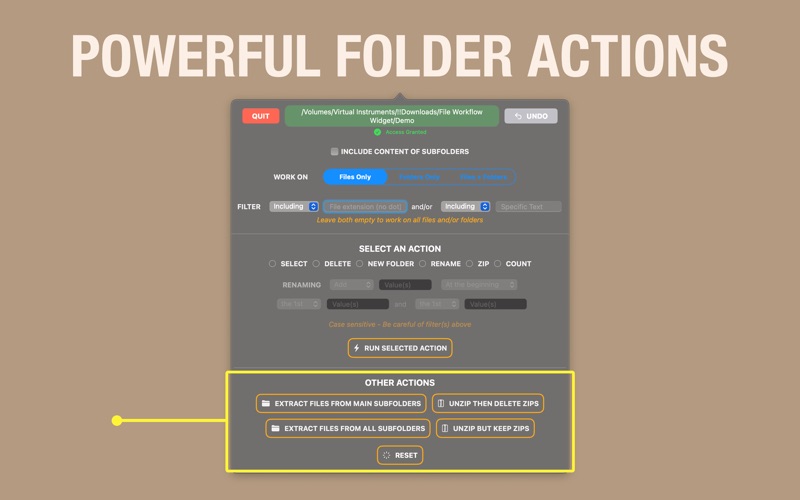
The application stands out due to its compact design and powerful feature set. Here are the key capabilities designed to streamline your daily digital tasks:
- Smart Filtering & Selection: Target specific files by their extensions or search for exact text matches, with full support for scanning subfolders.
- Batch Renaming & Text Controls: Add, replace, or remove text within multiple filenames simultaneously using advanced positioning rules.
- Folder Extraction: Instantly pull files out of deep subfolder networks and consolidate them into a single directory.
- ZIP Management: Unzip multiple archives at once, with the convenient option to delete or keep the original ZIP files.
- Drag & Drop Integration: Grant directory access instantly by dropping any folder directly onto the widget interface.
Streamlined Workflow Operations
What makes the File Workflow Widget file management tool particularly compelling is its ease of use. Users can switch between operating exclusively on files, folders, or both simultaneously. If you make a mistake or want to run a completely new batch, a dedicated one-click reset button instantly clears your current filters so you can start fresh. It provides a level of control that standard Finder actions struggle to replicate without complex scripting.
Our Editorial Verdict
For Mac users seeking to reclaim their time from repetitive folder cleanup, this utility offers an elegant, menu bar-resident solution. While the free version allows you to select and delete files, unlocking the full suite of batch renaming, moving, and archiving tools requires a subscription. To explore its features and integrate it into your daily routine, visit the official Apple App Store to download the utility directly from the developer.
Rate the App
User Reviews














Popular Apps










Editor's Choice